
The Rainbow Six Siege Marketplace has changed how players buy, sell, and trade cosmetic items in the game. If you’re wondering how to trade on R6 Marketplace with your friends or looking for ways to get those rare weapon skins you’ve always wanted, you’re in the right place. This complete guide covers everything about R6 trading, from basic requirements to advanced strategies that help you coordinate trades with friends.
While the R6 Marketplace doesn’t allow direct friend-to-friend transfers, there are smart workarounds that let you trade in-game items with people you know. Whether you’re trying to sell operator skins, buy charms, or exchange uniforms and headgear, understanding how the Siege Marketplace works will save you time and R6 Credits.
In this guide, we’ll walk you through the complete process of using the R6S Marketplace, share expert trading tips, explain all the marketplace requirements, and show you exactly how to coordinate trades with friends safely. Let’s dive in.
Table of Contents
What is R6 Marketplace Trading?
The R6 Marketplace is Ubisoft’s official platform where Rainbow Six Siege players can buy and sell cosmetic items using R6 Credits. Unlike traditional in-game stores where you purchase items directly from developers, the Rainbow 6 Marketplace creates a player-to-player economy where supply and demand determine prices.
Tradable items on the marketplace include:
- Weapon skins for all firearms
- Operator skins (uniforms and headgear)
- Charms that attach to weapons
- Attachment skins for weapon modifications
- Operator portraits and card backgrounds
- Drone skins
The marketplace operates on an order-based system. When you want to buy something, you place an order with your maximum price, and the system automatically matches you with the lowest available seller. When selling, you list your items at your desired price, and buyers place bids. This system ensures fair market trends and competitive pricing.
What makes R6 trading unique:
The transaction fee is 10% of the sale price, which Ubisoft automatically deducts when an item sells. This fee helps regulate the economy and prevents price manipulation. Unlike games like CS2 or Team Fortress 2, you cannot convert R6 Credits back to real money—the marketplace exists purely within the game ecosystem.
Players use the R6 Marketplace for several reasons:
- Getting rare seasonal skins that are no longer available in the store
- Selling unwanted cosmetics to earn credits for new items
- Finding better deals than the official in-game shop
- Building collections of specific operator themes or weapon sets
The marketplace went from closed beta to full public access in June 2024, and Ubisoft continues to add features and improvements based on community feedback.
Can You Trade Directly with Friends on R6?
Here’s the truth that most players want to know: No, you cannot trade directly with friends on the R6 Marketplace. The system doesn’t support person-to-person transfers or gifting between accounts.
Why doesn’t Ubisoft allow direct friend trades?
The Rainbow Six Siege Marketplace uses a public listing system to prevent scams, price manipulation, and fraud. Direct trading between friends could create problems like:
- Account theft through social engineering
- Real-money trading that violates terms of service
- Price manipulation schemes
- Stolen account item transfers
However, there are legitimate workarounds to coordinate trades with friends:
Method 1: Coordinated Timing Strategy
You and your friend can coordinate through external communication (Discord, phone, etc.) to list and buy items at specific times with unique pricing. Here’s how:
- Your friend lists an item at an unusual price (like 347 credits instead of 350)
- They tell you the exact price and listing time
- You immediately search for the item and place an order at that exact price
- The system matches you together if no one else has that specific price
Success rate: About 70-80% if done during low-traffic hours (early morning in your region)
Method 2: Low-Demand Item Strategy
Choose cosmetic items with very few active listings and buyers. Rare seasonal items from older seasons often have just 2-3 listings. With clear communication, you can ensure your friend’s listing is the only one at a specific price point when you buy.
Method 3: Bundle Exchange Strategy
If both you and your friend have items the other wants, you can create a reciprocal exchange:
- Friend A lists Item X at agreed price
- Friend B lists Item Y at agreed price
- Both buy from each other simultaneously
- Account for the 10% transaction fee in your pricing
Important warning: These methods work but aren’t guaranteed. The marketplace is public, so anyone can potentially buy the item before you do. Never transfer valuable items this way if you can’t afford to lose them.
Requirements to Access R6 Marketplace
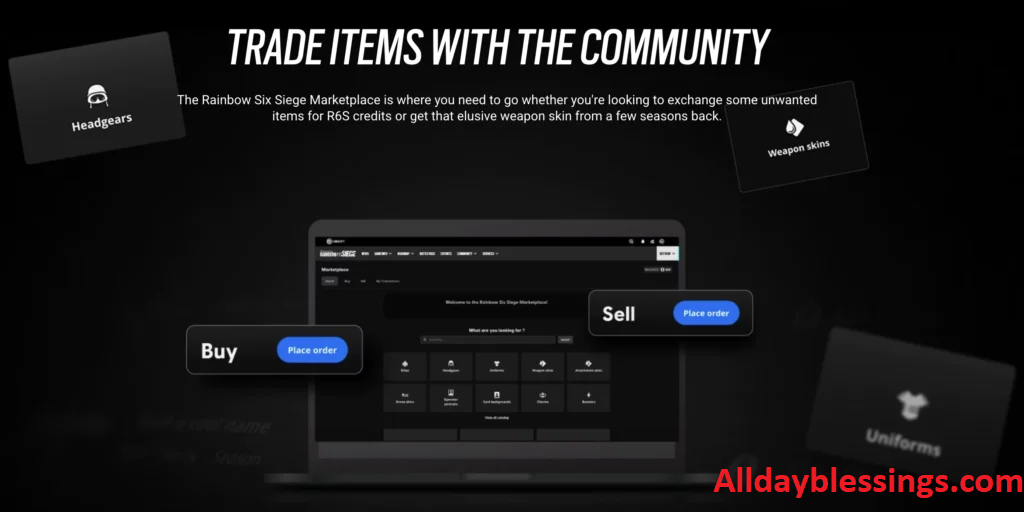
Before you can start trading in-game items on the Siege Marketplace, you must meet specific requirements set by Ubisoft. These rules protect both buyers and sellers from fraud and ensure a safe trading environment.
Account Level Requirements
Your account must be at least Level 25 to access the marketplace. This requirement prevents brand-new accounts and bots from flooding the system with fraudulent listings.
How to check your account level:
- Open Rainbow Six Siege
- Go to your player profile
- Your level displays next to your username
If you’re below Level 25:
You need to earn experience points (XP) through gameplay. The fastest ways to level up include:
- Playing Ranked or Unranked matches (highest XP rewards)
- Completing daily and weekly challenges
- Winning matches (victory bonus XP)
- Playing during double XP events
Most players reach clearance level 25 after 30-40 hours of gameplay, depending on performance and match types.
| Match Type | Average XP per Match | Matches to Level 25 |
|---|---|---|
| Ranked (Win) | 800-1,200 | 35-45 |
| Ranked (Loss) | 400-600 | 70-85 |
| Unranked | 600-900 | 45-60 |
| Quick Match | 300-500 | 85-110 |
Pro tip: Focus on Ranked or Unranked modes if you want to reach level 25 quickly while also improving your skills.
How to Snipe on R6 Marketplace (2025): Complete Guide to Get Rare Skins Cheap
Security Settings
Security is critical for R6 Marketplace access. Ubisoft requires these security measures on your Ubisoft account:
1. Two-Factor Authentication (2FA)
Two-Factor Authentication adds an extra security layer beyond your password. When enabled, you need both your password and a temporary code from your phone to log in.
How to enable 2FA:
- Go to account.ubisoft.com
- Log in to your Ubisoft account
- Navigate to Account Information > Security
- Select “Enable Two-Factor Authentication”
- Choose your method (authenticator app or SMS)
- Follow the setup instructions
- Save your backup codes in a safe place
Recommended: Use an authenticator app like Google Authenticator or Authy instead of SMS for better security.
2. Verified Recovery Email
Your recovery email must be verified to use the R6S Marketplace. This email helps you regain account access if you forget your password or lose your 2FA device.
How to verify your email:
- Go to your Ubisoft account settings
- Check the email address listed under Account Information
- If unverified, click “Send verification email”
- Check your inbox (and spam folder)
- Click the verification link in the email
3. Age Verification
You must be at least 13 years old to use the marketplace. Ubisoft verifies this through your account birthdate. If your account shows an age under 13, you cannot access trading features.
Cannot change your birthdate: Ubisoft locks birthdate information permanently for age verification compliance. If you entered the wrong date during account creation, you may need to contact support.
| Requirement | Details | Time to Complete |
|---|---|---|
| Account Level | Level 25 minimum | 30-40 hours gameplay |
| 2FA | Authenticator app or SMS | 5-10 minutes |
| Verified Email | Must confirm via email link | 2-3 minutes |
| Age | 13 years or older | Instant (if already met) |
Once you meet all these marketplace requirements, you’re ready to sign up for R6 Marketplace and start trading.
How to Set Up R6 Marketplace Account
Setting up your R6 Marketplace login takes just a few minutes once you meet all the requirements. Follow this step-by-step process to activate your marketplace access.
Step 1: Visit the Official Marketplace Website
- Open your web browser
- Go to the official Rainbow Six Siege Marketplace website
- The URL is typically: ubisoft.com/game/rainbow-six/siege/marketplace
- Make sure you’re on the official Ubisoft domain (check for the secure lock icon)
Security warning: Never enter your Ubisoft account credentials on unofficial websites. Phishing scams targeting R6 players are common. Always verify you’re on the legitimate Ubisoft domain.
Step 2: Log In with Your Ubisoft Account
- Look for the “Log In” button (usually in the top-right corner)
- Click it to open the login page
- Enter your Ubisoft email address and password
- Complete the Two-Factor Authentication verification
- Enter the code from your authenticator app or SMS
Step 3: Complete Account Verification
After logging in for the first time, the system will verify your account meets all requirements:
- Checking your account level (must be 25+)
- Verifying 2FA is enabled
- Confirming your email is verified
- Validating your age meets minimum requirements
If you see an error message like “You do not currently meet the requirements to trade in the Marketplace”, go back and ensure you’ve completed all security settings and reached level 25.
Step 4: Accept Terms and Conditions
- Read through the marketplace terms of service
- Pay attention to sections about:
- The 10% transaction fee on all sales
- Prohibited activities (scamming, price manipulation)
- Refund policies (sales are final)
- Account suspension rules
- Check the box to accept the terms
- Click “Continue” or “Agree and Continue”
Step 5: Link Your In-Game Inventory
The marketplace automatically syncs with your Rainbow Six Siege inventory. This process:
- Imports all your tradable items
- Displays which items are eligible for sale
- Shows items that are trade-locked (recent purchases or seasonal restrictions)
- Updates in real-time when you acquire new items
Understanding trade locks:
Items from the current season cannot be sold immediately. They become tradable items once the next season begins. This prevents immediate reselling of newly purchased cosmetics and helps maintain item value.
Step 6: Explore the Interface
Take time to familiarize yourself with the marketplace layout:
Buy Tab:
- Search for specific items
- Filter by category (weapon skins, operator skins, charms, etc.)
- Sort by price (low to high, high to low)
- View current buy orders and asking prices
- Check price history and market trends
Sell Tab:
- View your inventory of sellable items
- See which items have active demand
- Check current market prices
- Create sell listings
My Transactions Tab:
- Track active listings
- View purchase history
- Monitor pending orders
- Check R6 Credits balance
Market Analytics Section:
- View 30-day price charts
- See volume of trades
- Identify trending items
- Compare prices across categories
Step 7: Add R6 Credits (If Needed)
If you plan to buy on R6 Marketplace, ensure you have sufficient R6 Credits:
- Click on your credit balance
- Select “Add Credits”
- Choose your payment method
- Complete the purchase through Ubisoft’s payment system
Credit amounts available:
- 600 credits: $4.99
- 1200 credits: $9.99
- 2670 credits: $19.99
- 4920 credits: $34.99
- 7560 credits: $49.99
Bonus tip: Larger credit packs offer better value per credit. If you plan to trade frequently, consider buying bigger packs.
Your account is now fully set up and ready for trading. You can start browsing items, creating listings, and coordinating trades with friends using the strategies we discussed earlier.
Step-by-Step: Trading Items in R6 Marketplace
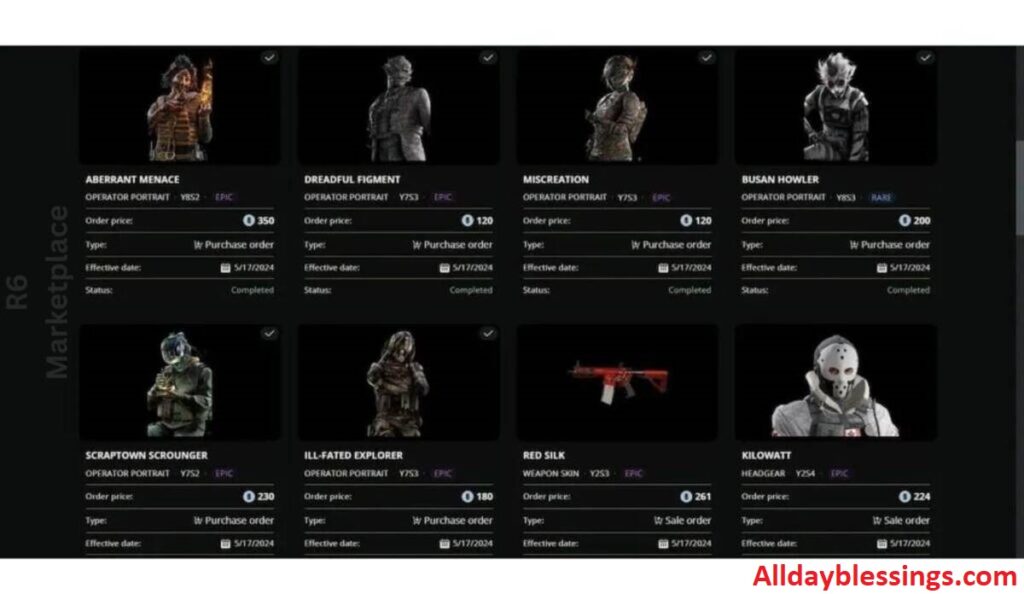
Now that your account is set up, let’s walk through the actual trading process. Whether you want to sell on R6 Marketplace or buy that perfect operator skin, these detailed steps will guide you through every transaction.
Listing Items for Sale
Selling your unwanted cosmetic items is the best way to earn R6 Credits for items you actually want. Here’s exactly how to list items for sale:
Step 1: Access Your Inventory
- Log in to the R6 Marketplace
- Click the “Sell” tab at the top
- Your complete inventory of sellable items appears
- Items are organized by category automatically
Step 2: Choose Items to Sell
Use filters to find specific items quickly:
- Filter by rarity: Common, Rare, Epic, Legendary
- Filter by type: Weapon skins, uniforms, headgear, charms, attachment skins
- Filter by operator: Specific operator cosmetics
- Filter by season: Items from particular seasonal releases
Pro tip: Start by selling duplicate items or cosmetics for operators you never play. Keep items for your main operators even if they’re currently low-value—you might want them later.
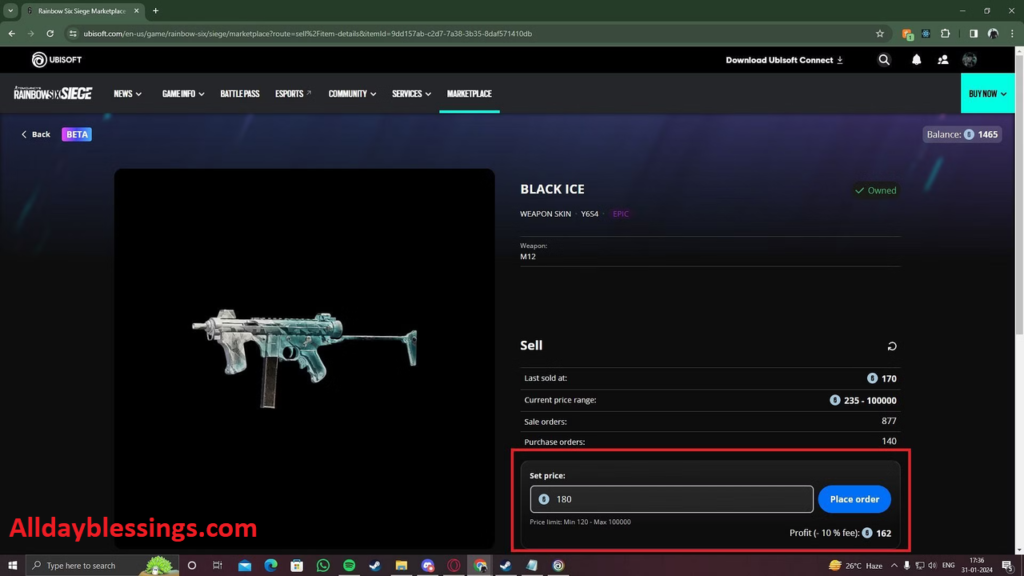
Step 3: Research Current Prices
Before listing, check what other sellers are asking:
- Click on the item you want to sell
- View the “Current Listings” section
- Note the lowest asking price
- Check the “Recent Sales” to see actual transaction prices
- Look at the 30-day price chart for market trends
Example price research:
| Black Ice Weapon Skin (R4-C) | Price Range |
|---|---|
| Lowest Current Listing | 1,250 credits |
| Highest Current Listing | 1,850 credits |
| Average Recent Sale | 1,400 credits |
| 30-Day Average | 1,375 credits |
Based on this data, listing at 1,350-1,400 credits would be competitive.
Step 4: Set Your Price
Consider these factors when pricing:
Price Aggressively (Lower):
- If you need credits immediately
- If the item has 50+ active listings
- If market trends show declining prices
- During new season launches (demand shifts to new items)
Price Moderately (Market Average):
- For items with 10-30 active listings
- When market prices are stable
- If you’re not in a hurry to sell
Price Premium (Higher):
- For extremely rare items (fewer than 5 listings)
- Limited-time seasonal exclusives
- Newly tradable items from previous season
- Items with rising demand trends
Remember the transaction fee: Ubisoft takes 10% when your item sells. If you list at 1,000 credits, you receive 900 credits. Factor this into your pricing strategy.
Step 5: Create Your Listing
- Enter your desired price
- Review the listing details (item name, price, estimated credit after fee)
- Click “List Item” or “Confirm Listing”
- Your item goes live immediately
Step 6: Manage Active Listings
After listing, you can:
- Adjust prices: Change your price if the item isn’t selling
- Cancel listings: Remove items from sale (useful if you change your mind)
- Relist items: If you cancel, you can list again anytime
Track your listings in “My Transactions”:
- View all active sales
- See how your price compares to others
- Monitor views and interest
- Check estimated time to sale based on current demand
Setting Competitive Prices
Price your items strategically to maximize sales and profits. Here are expert strategies:
Strategy 1: Undercut by Small Margins
List your item 5-10 credits below the lowest current price:
- Your listing appears at the top
- Buyers see you as the best deal
- You still get near-market value
- Items sell 3-4x faster
Example: If lowest listing is 850 credits, list at 840 credits.
Strategy 2: Bundle Pricing Psychology
Use pricing that feels like a deal:
- 495 instead of 500
- 990 instead of 1,000
- 1,475 instead of 1,500
These prices psychologically feel cheaper even though the difference is minimal.
Strategy 3: High-Volume Quick Flip
For common items with high demand:
- Buy items below market value
- Relist immediately at market average
- Make small profits per item (50-100 credits)
- Do this repeatedly with multiple items
Warning: This requires active monitoring and understanding of market trends. Don’t tie up all your credits in items that might drop in value.
Strategy 4: Patience Premium
For rare weapon skins and operator skins:
- List at 10-15% above market average
- Wait for a buyer willing to pay premium
- Works best with items that have fewer than 5 active listings
Example: If average price is 2,000 credits, list at 2,200-2,300 and wait. Collectors and impatient buyers will eventually purchase.
Strategy 5: Seasonal Timing
Prices fluctuate based on game updates:
High Prices (List During These Times):
- Mid-season (highest player engagement)
- After operator reworks (renewed interest in specific operators)
- During esports events (pros influence meta and popularity)
Low Prices (Buy During These Times):
- Season launch week (everyone selling old items for new ones)
- Holiday periods (fewer active players)
- After major nerfs to operators (demand drops)
Price Adjustment Timeline:
| If No Sale After… | Action |
|---|---|
| 24 hours | Reduce price by 5% |
| 3 days | Reduce price by 10% |
| 7 days | Reduce price by 15-20% or relist |
| 14 days | Consider if item is actually in demand |
Coordinating with Friends
While you can’t directly gift items, these coordination strategies increase your success rate when trading with friends:
Coordination Method 1: Off-Peak Trading
- Choose trading times with lowest player activity:
- 3-6 AM in your region
- Weekday mornings
- During major sporting events or holidays
- Your friend lists the item at an unusual price (e.g., 743 credits)
- You immediately search and place an order at exactly 743 credits
- Lower competition means higher success rate
Success rate: 85% during off-peak hours vs. 60% during peak hours
Coordination Method 2: Rare Item Strategy
Focus on items with minimal market activity:
- Choose items with fewer than 3 active listings
- Your friend becomes the only seller at a specific price
- You buy immediately when they list
- Almost guaranteed success due to low competition
Best item categories for this method:
- Old seasonal weapon skins (2+ years old)
- Unpopular operator uniforms and headgear
- Charms from limited-time events
- Attachment skins (lowest demand category)
Coordination Method 3: Communication Protocol
Establish clear communication to avoid mistakes:
Before Trading:
- Confirm exact item name and rarity
- Agree on precise price (include all digits)
- Set exact time window (within 60 seconds)
- Designate who lists first
- Have backup plan if first attempt fails
During Trading:
- Use voice chat or instant messaging
- Count down: “Listing in 3… 2… 1… Listed!”
- Buyer immediately searches and purchases
- Confirm transaction completed on both sides
After Trading:
- Verify item received
- Check credit balance changes
- Document successful price points for future trades
Coordination Method 4: Reciprocal Exchange
When both friends want items from each other:
Example scenario:
- Friend A wants Item X (worth 1,000 credits)
- Friend B wants Item Y (worth 1,000 credits)
- Both items have similar market value
Process:
- Friend A lists Item Y at 1,000 credits
- Friend B lists Item X at 1,000 credits
- Both buy from each other simultaneously
- Each receives 900 credits after 10% fee
- Net cost per person: 100 credits (the transaction fee)
For unequal value trades:
If items have different values, the person receiving the more valuable item should compensate:
- Friend A’s item worth: 1,500 credits
- Friend B’s item worth: 1,000 credits
- Difference: 500 credits
Solution: Friend B sends a second low-value item worth approximately 500 credits, or Friend A lists their item at a discounted price.
Coordination Method 5: Private Discord Server Setup
Create a dedicated coordination system:
- Set up private Discord server for your trading group
- Create channels:
- #trade-coordination (active trade planning)
- #price-tracking (share market research)
- #success-stories (document what works)
- #failed-attempts (learn from mistakes)
- Use bots to set timers and reminders
- Schedule regular trading sessions
Advanced Coordination: The Three-Person Triangle
When coordinating with multiple friends:
- Person A wants item from Person B
- Person B wants item from Person C
- Person C wants item from Person A
Execute all three trades simultaneously for triple the efficiency.
Risk Management When Coordinating:
Even with perfect coordination, things can go wrong:
If someone else buys the item first:
- Don’t panic
- Your friend can relist immediately
- Try again with different timing or pricing
- Consider using more obscure price points (like 1,247 instead of 1,250)
If you accidentally buy the wrong item:
- You can relist it immediately (though you’ll lose 10% to fees)
- Double-check item names—some cosmetics have similar names
- Use screenshots to confirm exact item before buying
If friend doesn’t receive your credits:
- Transaction may be processing (wait 2-3 minutes)
- Check “My Transactions” for confirmation
- Contact Ubisoft support if credits don’t appear after 10 minutes
Best Practices for Friend-to-Friend Trading
Following these best practices ensures safe trading and maximizes your success when exchanging items with friends through the R6 Marketplace.
Practice 1: Start with Low-Value Items
Before attempting trades with expensive legendary weapon skins or rare operator skins, practice the coordination process with cheaper items:
- Test with items worth 100-300 credits
- Perfect your timing and communication
- Learn the marketplace interface thoroughly
- Understand how quickly listings appear in search results
Why this matters: Losing a 200-credit item to a failed coordination is a learning experience. Losing a 3,000-credit item is devastating.
Practice 2: Document Everything
Keep detailed records of trades:
Create a trading log with:
- Date and time of trade
- Item name and rarity
- Agreed price
- Who listed first
- Success or failure
- Notes about what worked or didn’t
Example log entry:
Date: December 24, 2025
Item: Black Ice - MP5 (Legendary)
Price: 1,337 credits
Time: 4:47 AM EST
Success: Yes
Notes: Off-peak timing worked perfectly, no competition
This documentation helps you identify patterns and improve future trading success rates.
Practice 3: Use Price Verification Tools
Before every trade, both parties should:
- Check current market prices independently
- Compare findings to ensure fair trade
- Screenshot prices for reference
- Agree on final price in writing
This prevents:
- Accidentally overcharging your friend
- Being scammed if someone pretends to be your friend
- Market changes between agreement and execution
- Disputes about agreed-upon prices
Practice 4: Establish Trust Verification
Confirm identity before high-value trades:
For valuable items (1,000+ credits):
- Use voice chat to confirm it’s really your friend
- Verify through multiple channels (Discord, in-game chat, text)
- Establish a “trade password” or phrase only you both know
- Be suspicious of rush requests without proper verification
Warning signs of impersonation:
- Friend suddenly wants to trade without voice chat
- Unusual urgency or pressure
- Slightly different username (l vs I, 0 vs O)
- Trading from a different platform than normal
Practice 5: Schedule Regular Trading Windows
Instead of ad-hoc trading attempts, establish routine times:
Example schedule:
- Every Tuesday at 5:00 AM (low player count)
- First Sunday of each month at 4:30 AM
- After major game updates (when marketplace activity is high)
Benefits:
- You’re both mentally prepared
- Can research prices in advance
- Builds consistent success through repetition
- Reduces coordination stress
Practice 6: Create a Fair Trading Policy
Establish rules within your friend group:
Sample policy:
- Always trade at current market value (no friend discounts that cause resentment)
- Split the 10% transaction fee cost (both pay 5%)
- Honor all agreed trades even if prices change
- Give 24-hour notice before canceling planned trade
- Help friends research prices before trading
Practice 7: Use Market Analytics
Leverage the marketplace’s built-in analytics:
Before every trade, check:
- 7-day price trend (going up or down?)
- Trading volume (high demand or stagnant?)
- Number of active listings (supply level)
- Recent sale prices (actual market value, not asking prices)
Smart trading decisions:
If analytics show:
- Rising prices + High volume = Wait to sell, prices may increase
- Falling prices + High volume = Sell quickly before further drops
- Rising prices + Low volume = False signal, may reverse soon
- Stable prices + High volume = Reliable market value, good time to trade
Practice 8: Protect Against Marketplace Scams
Even when trading with friends, stay vigilant:
Common scams to avoid:
The Fake Friend Scam:
- Someone impersonates your friend
- Asks you to list item at specific price
- They buy it instead of your friend
- Prevention: Always verify identity through voice or video
The Price Manipulation Scam:
- Scammer tells you to buy specific item
- Claims price is about to increase
- You buy, they sell to you at inflated price
- Price immediately drops
- Prevention: Do your own market research, never trust unsolicited trade advice
The Account Hijacking Scam:
- Scammer claims to be Ubisoft support
- Says your account needs “verification” for marketplace
- Asks for password or 2FA codes
- Prevention: Ubisoft never asks for passwords; always use official support channels
Practice 9: Optimize Your Credit Management
Smart credit management improves trading efficiency:
Keep a credit reserve:
- Always maintain 500-1,000 credits for quick opportunities
- Don’t spend all credits immediately after sales
- This allows flexible trading with friends on short notice
Track your profit/loss:
- Calculate actual profit after 10% fees
- Account for failed coordination attempts (relisting costs)
- Understand your true trading success rate
Example calculation:
- Bought item for 1,000 credits
- Sold to friend for 1,100 credits
- After 10% fee: 990 credits received
- Net loss: -10 credits
Even if your friend “paid more,” the fee means you lost money. Factor this into pricing discussions.
Practice 10: Communicate Transparently
Honest communication prevents friendship damage:
Always discuss:
- Your actual needs and budget
- If you can’t afford agreed price
- If you found the item cheaper elsewhere
- If you’re only trading for profit, not helping a friend
Don’t:
- Lie about prices to make profit off friends
- Cancel trades without explanation
- Pressure friends into unfair trades
- Ghost friends after receiving items
Remember: Your friendship is worth more than any in-game items. Prioritize maintaining good relationships over maximizing credit profits.
Common Mistakes to Avoid
Even experienced traders make mistakes that cost them R6 Credits and rare cosmetic items. Learn from these common errors to improve your trading success.
Mistake 1: Ignoring Market Research
The error: Listing items without checking current prices or market trends.
What happens:
- You list too low and lose potential credits
- You list too high and item never sells
- You miss opportunities to buy underpriced items
Real example: A player listed a rare Black Ice weapon skin for 800 credits without research. The current market price was 1,400 credits. Another trader immediately bought it and relisted for profit. The original seller lost 600+ credits (after fees).
How to avoid:
- Always check last 10 sales before listing
- Review 30-day price chart
- Compare your item to similar cosmetics
- Spend 3-5 minutes researching before every trade
Mistake 2: Trading During Peak Hours
The error: Attempting friend coordination when thousands of players are active.
What happens:
- Someone else buys your friend’s listing before you
- Your specific price gets lost among dozens of similar listings
- Higher competition means lower success rate
- You waste time on failed attempts
Statistics: Peak hours (6 PM – 11 PM) have 4x more active buyers than off-peak (3 AM – 7 AM).
How to avoid:
- Schedule trades for early morning hours
- Trade on weekday mornings instead of weekend evenings
- Check player count indicators before trading
- If coordination fails during peak hours, wait and try again later
Mistake 3: Overlooking the Transaction Fee
The error: Forgetting Ubisoft takes 10% of every sale.
What happens:
- You receive less than expected
- Profit calculations are wrong
- You can’t afford the item you wanted to buy next
Example miscalculation:
- Expected sale price: 2,000 credits
- Actual credits received: 1,800 credits
- Shortfall: 200 credits
How to avoid:
- Always calculate net amount (sale price × 0.90)
- Factor fees into all price negotiations
- Add 11% to desired amount when pricing (to compensate for the 10% fee)
Formula: If you need 1,000 credits, list at 1,111 credits (after 10% fee, you get approximately 1,000)
Mistake 4: Buying Inflated Items
The error: Purchasing items at peak prices due to temporary hype.
What happens:
- New operator release creates artificial demand
- Prices spike 50-200% above normal
- Prices crash back down within 2-3 weeks
- You overpaid significantly
Real scenario: When Operator Fenrir was released, his signature weapon skins jumped from 600 credits to 1,500 credits. Players who bought at peak price watched values drop to 700 credits within one month.
How to avoid:
- Wait 2-3 weeks after new season launches
- Buy during price dips, not during hype
- Set price alerts for items you want
- Be patient—almost all items eventually drop in price
Mistake 5: Listing Too Many Items at Once
The error: Flooding your own listings with multiple items, creating internal competition.
What happens:
- Your listings compete against each other
- Buyers choose your cheapest listing, leaving expensive ones unsold
- You tie up inventory that could be priced better
- Marketplace displays prioritize new listings over yours
How to avoid:
- List 2-3 items maximum at a time
- Stagger listings by 24-48 hours
- Focus on highest-value items first
- Wait for sales before listing more
Mistake 6: Accepting First Offer
The error: Listing at the first price you see without negotiation research.
What happens:
- You might accept 20-30% below true market value
- Current lowest listing might be a desperate seller
- You don’t account for rising trends
How to check:
- View ALL current listings (not just first page)
- Check “Recent Sales” tab—actual prices, not asking prices
- Compare to 7-day and 30-day average
- List at median price, not lowest
Mistake 7: Trading Impulsively
The error: Making quick trade decisions without planning or research.
Common impulsive mistakes:
- “This looks rare, I’ll buy it now!” (without checking if it’s actually rare)
- “My friend needs this urgently!” (overpaying due to artificial urgency)
- “This seems like a good deal!” (without price comparison)
How to avoid:
- Implement a 24-hour rule for purchases over 1,000 credits
- Create a wishlist and research prices before trading
- Never trade under pressure
- Take screenshots and research later if unsure
Mistake 8: Ignoring Trade Locks
The error: Planning trades without understanding what items are actually tradable.
**What happens:**
- You can’t sell current-season items until next season
- Recently purchased items have temporary holds
- Some promotional items are never tradable
Check before every trade:
- Green icon = Tradable now
- Red icon = Trade-locked
- Gray icon = Never tradable
How to avoid:
- Check item status before planning trades
- Understand seasonal restrictions
- Don’t promise items you can’t actually trade yet
Mistake 9: Poor Communication with Friends
The error: Vague or unclear coordination that leads to failed trades.
Examples of poor communication:
- “List around 1,000” (what’s “around”? 950? 1,050? 1,100?)
- “Do it soon” (when exactly?)
- “The Ash skin” (which one? She has 20+ skins)
What goes wrong:
- You buy the wrong item
- Your friend lists at wrong time
- Someone else completes the trade
- Arguments damage friendships
How to avoid:
- Use exact numbers: “List at exactly 1,347 credits”
- Use specific times: “List at 4:47 AM EST, I’ll buy at 4:48 AM”
- Use full item names: “Ash Elite Sidewinder Uniform, Legendary rarity”
- Confirm details in writing before trading
Mistake 10: Keeping Items You’ll Never Use
The error: Hoarding low-value cosmetics instead of converting them to credits.
What happens:
- Credits sit unused in your inventory
- Item values potentially decrease over time
- You miss opportunities to buy items you actually want
Inventory management strategy:
- If you haven’t used an item in 3+ months, list it
- Keep only cosmetics for your top 5 operators
- Sell duplicate items immediately
- Convert charms you never equip into credits
Average player inventory waste: 2,000-4,000 credits worth of unused items
Mistake 11: Falling for “Too Good to Be True” Deals
The error: Buying suspiciously cheap items without questioning why.
Warning signs:
- Item listed at 50%+ below market value
- Account with no trading history
- Pressure to buy “before someone else does”
Potential problems:
- Scam coordination setup
- Price manipulation scheme
- Stolen account attempting to liquidate items
How to avoid:
- If it seems too good to be true, it probably is
- Check seller’s transaction history
- Research why price might be abnormally low
- Ask yourself: “Would I sell my item this cheap?”
Mistake 12: Not Tracking Failed Coordination Attempts
The error: Repeatedly trying the same coordination method that doesn’t work.
What happens:
- You waste time on low-success strategies
- You lose credits on transaction fees from relisting
- Frustration damages trading relationships
Better approach:
- Document every attempt (success and failure)
- Note time, price, competition level
- Identify patterns (e.g., “Failed 4/5 times on weekend evenings”)
- Adjust strategy based on data
Tips for Getting the Best Deals
Master these strategies to maximize value whether you’re buying or selling in-game items on the Rainbow Six Siege Marketplace.
Tip 1: Buy Immediately After Season Launch
Why it works: Players rush to sell old seasonal items to buy new cosmetics, flooding the market with supply.
Strategy:
- First 3-7 days of new season = lowest prices
- Focus on items from previous season
- Buy rare weapon skins when everyone else is selling
- Hold items for 2-3 months, then sell when demand returns
Average discount: 25-40% below pre-season prices
Example: Elite set uniforms that sold for 2,000 credits pre-season drop to 1,200-1,400 credits during launch week.
Tip 2: Sell During Mid-Season
Why it works: Player engagement peaks mid-season when:
- New operators are balanced and popular
- Limited-time events create excitement
- Esports seasons are active
- No one is clearing inventory for new season
Strategy:
- List items weeks 6-10 of a 12-week season
- Prices are 15-25% higher than season launch
- Demand is high but supply has normalized
Tip 3: Use Buyer Patience
Why it works: Urgent buyers pay premium prices.
Strategy for buyers:
- Place an order at 10-15% below current lowest listing
- Wait 3-7 days
- A desperate seller will eventually match your price
- You get the item cheaper without actively searching
Success rate: 60-70% for non-rare items
Strategy for sellers:
- List at market average, not absolute lowest
- Wait for the patient buyer willing to pay fair price
- Don’t panic and drop prices immediately
Tip 4: Follow Operator Meta Changes
Why it works: Operator buffs and nerfs directly impact cosmetic demand.
When operators get buffed:
- Their pick rate increases 30-50%
- Cosmetic demand rises immediately
- Prices increase 20-40% within one week
Strategy:
- Read patch notes before they go live
- Buy cosmetics for operators receiving buffs
- Sell immediately after patch when demand peaks
- Repeat for profit
When operators get nerfed:
- Prices drop as players stop playing them
- Buy cosmetics at discounted prices
- Hold until operator is rebuffed (happens often)
Tip 5: Bundle Buying Strategy
Why it works: Sellers with full sets sometimes offer better deals to move inventory faster.
Strategy:
- Contact sellers who have complete operator sets
- Offer to buy 3-4 items together
- Negotiate slight discount (5-10%) for bulk purchase
- Use friend-coordination method for each item
- Save compared to buying individually
Best categories for bundling:
- Complete operator cosmetic sets (uniform + headgear + weapon skins)
- Seasonal collection items
- Charms from same event
Tip 6: Monitor Esports Influence
Why it works: Professional play influences which operators and skins are desirable.
Strategy:
- Watch major tournaments (Six Invitational, Majors)
- Note which operators pros frequently use
- Buy related operator skins before casual players catch on
- Sell when demand increases from “pro player effect”
Historical example: When pro players heavily featured Jäger during tournaments, his weapon skins increased 35% in value over two weeks.
Tip 7: Exploit Rarity Misunderstanding
Why it works: Rarity color doesn’t always equal market value.
Strategy:
- Some Epic items are rarer than Legendary items
- Limited-time Rare items often cost more than permanent Legendary items
- Research actual scarcity, not just color designation
Smart trades:
- Legendary permanent item (600 credits) traded for
- Epic limited seasonal item (1,200 credits)
- Both are “rarer” items, but market values differ significantly
Tip 8: Set Price Alerts
Why it works: You can buy when prices hit your target without constant monitoring.
Manual method:
- Check your target item’s price daily
- Note lowest 3 listings
- When price drops below threshold, buy immediately
Automated method:
- Use marketplace tracking websites
- Set email alerts for specific items under target price
- Get notified when deals appear
Tip 9: Understand Psychological Pricing
Why it works: Certain prices attract more buyers.
Selling tactics:
- 490 instead of 500 (seems significantly cheaper)
- 995 instead of 1,000 (breaks psychological barrier)
- 1,999 instead of 2,000 (stays under 2K)
Buying tactics:
- Sort by “Price: Low to High”
- These psychological prices appear first
- Sellers using them often price items just slightly below competition
Tip 10: Trade Rotation Strategy
Why it works: Converting items to credits to different items yields better value than direct trades.
Example:
- You have Item A (worth 1,000 credits)
- Friend has Item B (worth 1,000 credits)
- Direct friend trade fails multiple times
Better approach:
- Sell Item A for 1,000 credits (receive 900 after fees)
- Wait for Item B to drop to 850 credits
- Buy Item B at discount
- Net savings: 50 credits compared to direct trade
- Plus you avoided coordination hassle
Tip 11: Create a Trading Network
Why it works: Larger friend groups increase coordination success.
Strategy:
- Build network of 5-10 trusted traders
- Share market research and price tracking
- Coordinate group trades (person A → B → C → A)
- Pool knowledge about best trading times
- Help each other find deals
Network benefits:
- Higher success rates (more people means more flexibility)
- Shared market intelligence
- Reduced reliance on single trading partner
- Learn from others’ successes and failures
Tip 12: Use Seasonal Timing
Why it works: Real-world events affect player behavior.
Best buying times:
- Christmas/Holiday season (players get gift credit cards)
- Summer break (younger players more active)
- Major game sales (new players join, sell starter items cheap)
Best selling times:
- Back to school (players want to trade before busy period)
- New season announcements (hype increases spending)
- Limited-time event endings (last-minute buyers pay premiums)
Tip 13: Invest in Future Tradable Items
Why it works: Current season items become tradable next season.
Strategy:
- Buy current season items at store prices
- Wait until next season when they become tradable
- Sell on marketplace (often at premium to store price)
- Limited items from current season become “rare” when no longer available
Risk: Only works if item demand remains high in future season
Best candidates:
- Pro League sets
- Event-exclusive items
- Operator Elite skins with limited availability
FAQ About Trading with Friends
Can you directly trade items with friends on R6 Marketplace?
No, direct trading is not possible. The marketplace uses public listings, but you can coordinate with friends by listing items at specific prices and buying simultaneously.
What is the minimum level required to access R6 Marketplace?
Your account must be at least Level 25 to use the marketplace.
What are R6 Marketplace transaction fees?
Ubisoft charges a 10% transaction fee on all sales, automatically deducted when your item sells.
How do I enable Two-Factor Authentication for trading?
Go to account.ubisoft.com, navigate to Security settings, and enable 2FA using an authenticator app or SMS verification.
Can I sell items from the current season?
No, current season items become tradable only when the next season begins, preventing immediate reselling.
What payment methods does R6 Marketplace accept?
The marketplace only accepts R6 Credits purchased through Ubisoft’s official payment systems—no external currencies allowed.
How long does it take for items to appear in my inventory after purchase?
Items typically appear instantly after purchase, though delays of 2-3 minutes can occur during high traffic.
Can I cancel a marketplace listing after posting?
Yes, you can cancel active listings anytime before someone purchases the item through your “My Transactions” page.
What happens if someone else buys my friend’s item first?
Your friend can immediately relist the item, and you can try again using different timing or more obscure pricing.
Are there refunds for marketplace purchases?
No, all marketplace sales are final with no refunds, so verify items carefully before buying.
How do I avoid marketplace scams?
Always verify friend identity, never share account credentials, research prices independently, and only use official Ubisoft marketplace website.
Can I trade Elite skins on the marketplace?
Only specific Elite set cosmetics are tradable; check each item’s tradable status before planning trades.
What’s the best time to coordinate trades with friends?
Early morning hours (3-7 AM) during weekdays offer lowest competition and highest success rates for coordination.
Do prices change based on operator pick rates?
Yes, operator buffs and nerfs significantly impact cosmetic prices, with popular operators commanding premium prices.
Can I use third-party websites for R6 trading?
Only use the official Ubisoft marketplace; third-party sites risk account suspension and fraud.
Conclusion
Trading in-game items on the R6 Marketplace requires understanding the system’s mechanics, market dynamics, and smart coordination strategies. While you can’t directly gift items to friends, the methods we’ve covered give you practical workarounds that work when executed properly.
Remember these key takeaways:
Essential Requirements: Reach Level 25, enable Two-Factor Authentication, verify your email, and ensure you’re 13+ years old before accessing the marketplace.
Smart Pricing: Always research current market trends, account for the 10% transaction fee, and adjust prices based on demand and timing.
Successful Coordination: Trade during off-peak hours, use precise pricing, communicate clearly with friends, and start with low-value items to practice.
Maximize Value: Buy during season launches when prices drop, sell mid-season when demand peaks, and follow operator meta changes for profitable trades.
Stay Safe: Verify friend identities, never share account credentials, avoid suspicious deals, and keep detailed records of all trades.
The Rainbow Six Siege Marketplace creates opportunities for players to get rare weapon skins, operator skins, charms, and other cosmetic items they want while earning R6 Credits from items they don’t use. By following the strategies in this guide, you’ll trade smarter, avoid common mistakes, and maximize the value of every transaction.
Whether you’re coordinating trades with friends or buying that perfect Black Ice skin you’ve always wanted, approach each trade with patience, research, and careful planning. The marketplace rewards prepared traders who understand timing, pricing, and coordination.
Start small, learn from each trade, and gradually build your experience. Before long, you’ll navigate the R6S Marketplace like a pro, getting the best deals while helping your friends do the same. Happy trading, and may all your coordination attempts succeed!

I’m Watson, a faith-inspired writer passionate about sharing heartfelt blessings and uplifting words that bring peace, gratitude, and hope. Through my daily blessings, I aim to comfort the soul and inspire spiritual growth.